
Subscription Guide
Compare plans, pricing, and manage your WTN Suite subscription
Subscription Guide
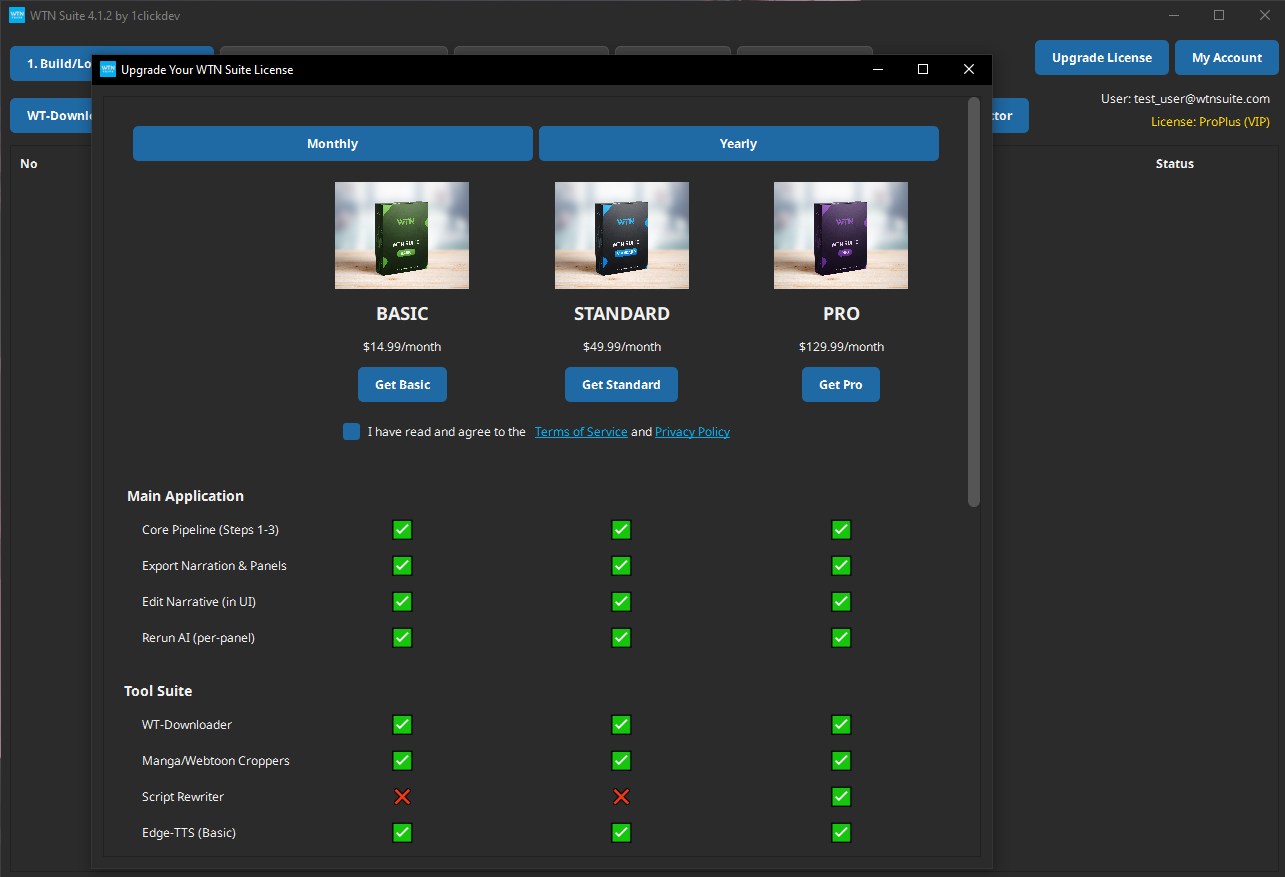
WTN Suite offers three subscription tiers designed for different levels of content creation. All plans include the core AI pipeline and essential tools.
Which Plan Should I Choose?
💡 Tip
New to WTN Suite? Start with the Basic plan. It includes everything you need to learn the workflow and create narrated videos. Upgrade when you need advanced features.
| If you want to... | You need |
|---|---|
| Try the basic workflow | Free trial |
| Create narrated videos at 1080p with Auto Character Handling | Basic |
| Use premium TTS voices + advanced video features | Standard |
| Access all features including Script Rewriter + 4K | Pro |
Plan Comparison
Core Features (All Plans)
| Feature | Basic | Standard | Pro |
|---|---|---|---|
| Core Pipeline (Panel Detection + AI Analysis + Narration) | Yes | Yes | Yes |
| Auto Character Handling | Yes | Yes | Yes |
| WT-Downloader | Yes | Yes | Yes |
| Manga Cropper | Yes | Yes | Yes |
| Webtoon Cropper | Yes | Yes | Yes |
| Edge-TTS | Yes | Yes | Yes |
| Panel Export | Yes | Yes | Yes |
| Narration Export | Yes | Yes | Yes |
| Character Cast Export | Yes | Yes | Yes |
Advanced Features
| Feature | Basic | Standard | Pro |
|---|---|---|---|
| Kokoro-TTS (premium voices) | — | Yes | Yes |
| Script Rewriter (AI polish) | — | — | Yes |
| Character Cast Import | — | — | Yes |
Video Compositor
| Feature | Basic | Standard | Pro |
|---|---|---|---|
| Max Resolution | 1080p | 2K | 4K |
| 16 Aspect Ratio | Yes | Yes | Yes |
| 9 / Portrait Ratios | — | Yes | Yes |
| Blurred Backgrounds | Yes | Yes | Yes |
| Custom Backgrounds | — | Yes | Yes |
| Background Music | — | Yes | Yes |
| Watermark Overlay | — | Yes | Yes |
| Intro/Outro Clips | — | Yes | Yes |
| Individual Clip Export | — | Yes | Yes |
CapCut Director
| Feature | Basic | Standard | Pro |
|---|---|---|---|
| In/Out Animations | — | Yes | Yes |
| Keyframe Animations | — | Yes | Yes |
| Subtitles | — | — | Yes |
| Advanced Keyframing | — | — | Yes |
Pricing
| Plan | Monthly | Yearly (save ~17%) |
|---|---|---|
| Basic | $14.99/mo | $149.90/yr |
| Standard | $49.99/mo | $499.90/yr |
| Pro | $129.99/mo | $1,299.90/yr |
💡 Tip
The yearly plan saves about 17% compared to monthly billing — equivalent to getting 2 months free.
Visit our Pricing page to subscribe.
Free Trial
You can use WTN Suite before subscribing with a limited feature set:
- Core pipeline (Steps 1–3) works
- Edge-TTS available
- Basic tools accessible
- Some features and higher resolutions are locked
ℹ️ Info
The trial has no time limit — use it as long as you want to evaluate WTN Suite. Subscribe when you're ready to unlock the full feature set.
Managing Your Subscription
All plan changes, payment updates, invoices, and cancellations happen in the billing portal — a secure page hosted by our payment provider (Stripe or PayPal).
From the Web Dashboard
- Log in at wtn-suite.com/dashboard
- Click Subscription in the sidebar
- Click Open Billing Portal
From the Desktop App
- Click "My Account" in WTN Suite
- Click "Manage Billing" — this opens the same billing portal in your browser
What you can do in the billing portal
- Change plan — upgrade or downgrade with automatic proration
- Update payment method — swap cards or billing address
- Download invoices — full purchase history and receipts
- Cancel subscription — ends billing at the current period's end
ℹ️ Info
When you upgrade or downgrade, you're only charged (or credited) the prorated difference for the remainder of your current billing period. No need to cancel and re-subscribe.
FAQ
Can I switch plans? Yes — upgrade or downgrade at any time. When upgrading, you only pay the difference for the rest of your current billing period (prorated billing).
What happens if my subscription expires? You'll return to the free trial with limited features. All your projects and data are preserved — resubscribe anytime to regain access.
What payment methods are accepted? All major credit and debit cards (Visa, Mastercard, American Express). Payment is processed securely through Stripe.
Do you offer refunds? Contact us on Discord for refund requests within 7 days of purchase.
Is there a free trial? Yes — you can use WTN Suite with limited features indefinitely before subscribing.
Next Steps
- Pricing page — Subscribe or change your plan
- Settings & Configuration — Configure your AI keys and preferences
- Quick Start Tutorial — Get started creating narrated videos